Essay
Model before pixels
Every user carries a model of your product in their head: what it's for, what's inside it, how the parts relate. If the interface matches that model, people find their way. If it doesn't, no amount of polish will save it.
So before I draw a screen, I draw the model.
What a conceptual model is
A conceptual model is a map of the things a person deals with and how they connect, in the person's own words. Not the database schema, not the org chart, not the feature list. The nouns users talk about, the verbs they use, and the relationships between them.
It answers three questions: what do people think this product is for, how do they think it works, and why do they use it? Once those answers are on a wall where everyone can see them, product, engineering and design can argue about the same thing.
An example
In 2012, at DesignMap, we worked with Bloomberg on Vault, a product that helps companies retain, search and produce their communications for regulators and lawsuits. It's a world of legal holds, data requests, custodians and audit trails. The product team knew the system inside out. What we needed was the user's view of it.
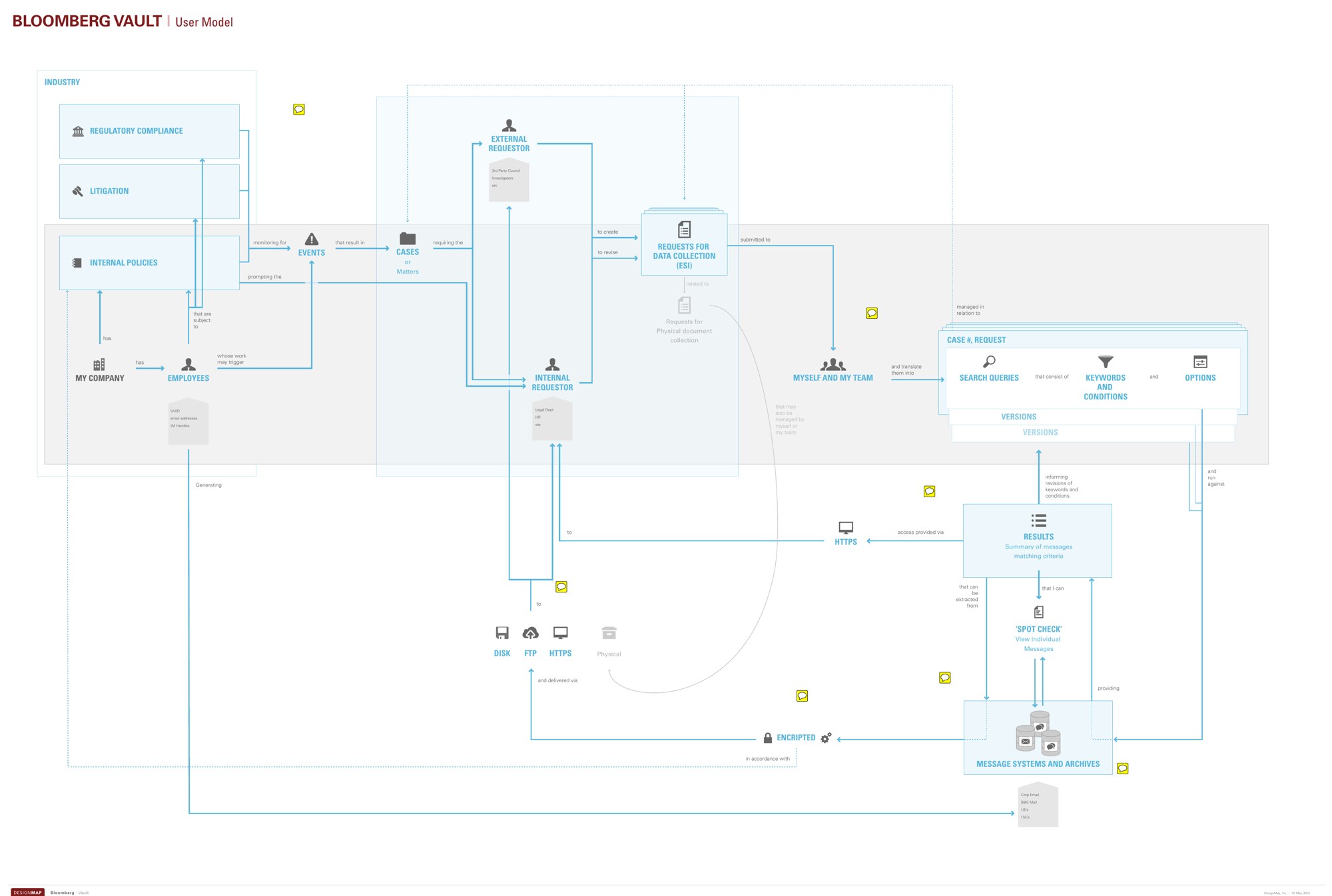
The model tells a simple story. Regulations, litigation and internal policies trigger events. Events become cases. Cases create requests for data. My team turns those requests into searches, refines them over versions, and runs them against the archives until the results are right.
Two things fell out of drawing it. First, the case, not the search, was the center of the user's world, so it became the organizing object of the interface. Second, searches were never written once. They were revised, compared and defended, so versioning moved from a back-end detail to a first-class feature.
Neither insight needed a single screen. Both changed every screen that followed.
How I build one
- Listen for nouns and verbs. In interviews and support tickets, write down the words people use for things and actions. Their words, not ours.
- Draw the relationships. Boxes for things, arrows for what one does to another, labelled in plain language. A whiteboard is fine.
- Find the center. One object usually anchors everything else. In Vault it was the case. In the tools I designed at [24]7 it was the bot. In a meeting system it's the agenda item.
- Test it on users. Show the model and ask "is this how it works for you?" The corrections are the most valuable research you'll get.
- Keep it alive. Pin it up, use it in reviews, update it when you learn something. A model nobody looks at is just a nice poster.
Why it's faster
It can feel slow to draw diagrams when everyone wants screens. But a model catches the expensive mistakes: the wrong object at the center, the missing relationship, the feature that only makes sense to the people who built it. Fixing those in a diagram takes an afternoon. Fixing them in shipped software takes a release.
And now that AI can produce a screen in seconds, screens are cheap. Knowing which screen to make, and what belongs on it, is the part that still takes a designer.